Commercial License Poll

The poll has a drop-down menu but the arrow doesn't show because it's too wide. The menu will come up if you click on the answer box.

Would you like me to offer commercial licenses?
pollcode.com free polls

Saturday, January 17, 2009

By Request

A few of you wanted me to make the templates I talked about in my last post, not only to use Becky Higgins' Project 365 downloads but also to eliminate the need for a background paper. I've made four 12x12 templates that have no background, just the photos and journaling blocks. The first two have vertical pictures and horizontal journaling blocks. The last two have horizontal pictures with vertical journaling blocks, which are also sized to fit Becky's downloads.

Here are today's templates:


For the 8.5x11 scrappers out there, I'm in a bit of a bind. Becky's kit was designed for a square (12x12) album. So I can make a template that works with her downloads, but there will be extra space where you would need to put a background color or paper. It would look like this:


And like this:


Or I can make a template that eliminates the need for a background but does not necessarily work with Becky's downloads. Leave a comment about which you would prefer.

Thursday, January 15, 2009

Photoshop Elements

I use Photoshop CS3, so I had no idea that Elements users could not work with the individual layers in a layer group. I'm sorry for those of you who had issues with this. I have uploaded new templates with the layers ungrouped. If I ever use layer groups in the future, the download will include templates both with and without the groups. Here are the download links for my previously released Project 365 templates:

** The original template downloads have now been updated to include templates for PSE users. **

Sunday, January 11, 2009

Becky Higgins

I'm sure you have already heard, but I'll say it just in case you haven't. Becky Higgins has on her blog a free download of some journaling card images from her Project 365 kit. I'm hearing that some people haven't been able to download it at all. I think the trick is in the timing, as I had no trouble downloading it early this morning. Keep trying.

I'm considering creating a template that would work with these images. For 12x12, the photos and journaling cards would basically take up the whole space, leaving no need to choose a background paper. I'm not sure yet how (or if) it would work at all for 8.5x11. I would like to know if there is any interest in this. Leave a comment or email me if you would like me to work on this template.

Friday, January 9, 2009

Six More

Okay, here are the other six Project 365 templates. The response to these templates has been tremendous! I may try to come up with a few other Project 365 designs. If anyone has any ideas for a template, feel free to leave a comment or email me.

Here are the 12x12 templates:


Here are the 8.5x11 templates:


And here are the 11x8.5 templates:


Tuesday, January 6, 2009

Project 365

So it looks like Project 365 has hit the scrapbooking world with full force. I know Project 365 has been around for a few years but never really thought about it as applied to scrapbooking. When I saw the KOTM by Becky Higgins, I wanted to get one myself. However, since I am a digital scrapper, I needed something different. Which is also a good thing considering the kits sold out within the first thirty minutes.

I started working on one digital template and ended up with twelve (four each of 12x12, 8.5x11, and 11x8.5). First off, I wanted to put one week on each page to cut down on the number of pages I needed to print. Then I wanted to be able to vary the look of the pages a tiny bit. I took my first template and simply rotated it around. And all of the 12x12 variations were converted into 8.5x11 and 11x8.5 sizes.

I have the six finished templates for you today and will be posting the other six when I am done with them. Note that I started my week on Monday so that the page would include a whole weekend. You can change that if you started on a different day.

Here are the 12x12 templates:


Here are the 8.5x11 templates:


Here are the 11x8.5 templates:


Monday, January 5, 2009

I'm Back

I'm back from my mini vacation! I'm super excited to say that my blog has been featured in the Web Finds column for the January/February issue of Scrap n' Art. It is an e-zine about scrapbooking, card making, and paper crafting. And it's completely free! If you would like to check it out, you can register at www.scrapnart.com and download the current issue as well as the previous three issues.

Stay tuned in the next couple of days. I have been working on several new templates and will be putting them up soon!

Monday, December 22, 2008

Links

Thanks to KraziKatLadi for pointing out some broken download links. I've re-uploaded the problem files, so they all should work now. If there are still any issues, please let me know.

Anyone else out there who has been meaning to make calendars but hasn't gotten around to it? Miss Mint's blog has a really great idea for a quick and simple calendar. You basically just take a photo and put a calendar stamp and mat onto it. Super easy. I made mine yesterday and printed it out this morning. I gave out CD case calendars last year and wanted to make "refills" this year. Instead of binding horizontal pictures, I just cropped the photos to the size of the CD case calendar pages.

** Update **
The following templates have been re-uploaded:
13a
18
35a
36
Let me know if there are any others that are not working.

Saturday, December 20, 2008

Seasons Greetings

I am working the next 8 days and then going out of town for 5 days, so it may be awhile until my next post. Here are SIX downloads (three 12x12 and three 8.5x11) to keep you busy! The first 2 sets are based off of a 2 page spread in a clothing catalog. The last set is based on a set of windows in my neighborhood. I saw it while driving to work the other day and thought it would make a nice page. I hope you all have a very merry Christmas and the happiest of New Years!

Here are the 8.5x11 templates:


Here are the 12x12 templates:


Friday, December 19, 2008

Semester End

So sorry I haven't posted anything new lately! I just finished my last final, so the past couple of weeks have been kind of hectic for me. Nothing new today either as I have not had time to work on a template. However, a couple of people have asked to see the timeline layout that I made of me and my boyfriend. So here you go!


Credits:
Background Paper: True Cream (recolored) from Miss Mint's Elegant Valentine Paper Pack
Stamps: Miss Mint's Elegant Valentine Element Pack
Fonts: Rough Typewriter and Porcelain


I'll try and be back soon with a new template (or two).

Sunday, December 7, 2008

Timeline

I saw an advertisement in a magazine that I thought would make a really great page. It had a line going across two pages with alternating pictures and captions. I decided to make a layout with a timeline of pictures of my boyfriend and me over the past six years. And since I was really happy with how it turned out, I created templates to share with all of you.

I have four versions. I have a two-page layout and a one-page layout in both 12x12 and 8.5x11 sizes. The two-page templates have eight photos and the one-page templates have four photos. I only put four on the one-page templates because the photos would have been too small otherwise.

First are the 12x12 templates:


And here are the 8.5x11 templates:


I hope you all have fun with these! I'd love to see what you are able to make with these, so feel free to leave a comment or email me a link to your layouts!

Thursday, December 4, 2008

Caught Up

I have five 8.5x11 templates for you today, which means I'm finally caught up. Well, at least with the converted templates. I still need to catch up on all the sketches. That may take awhile. But at least now when I release a new template, I will have both sizes available at the same time!

Here are today's templates:


Monday, December 1, 2008

Entertainment Books

I love these things! They have saved me so much money. The trick, of course, is to only use the coupons on things you were going to spend money on anyway. Last year, I spent $20 and probably saved at least 5 times that.

If you have not already purchased your book, I saw a great deal posted in the slickdeals.net forums. The Entertainment book is now $10 off plus free shipping. Also, if you are a registered Cashbaq member, you can get $10 cash back. If you are a new member, you also get $5 just for joining. For those of you not familiar, www.cashbaq.com is a site that offers you varying percentages cash back on purchases you make from their site. Once your Cashbaq balance is over $10, they either send you a check or credit your PayPal account. I only just joined, so I can't really vouch for it personally, but I have seen several people talking about it on various money-saving forums.

Anyway, I just purchased my book. With everyone's finances hurting right now, I wanted to pass along the info. I hope it is able to help some of you out.

Wednesday, November 26, 2008

Happy Thanksgiving!

I'm sorry it's been awhile since my last post. I've been really busy with school. But I'm back with a few templates for you. Just in time for Thanksgiving!

Here are three 8.5x11 templates:


And here is one 12x12 template:


I hope you all have a great Thanksgiving!

Saturday, November 15, 2008

Questions and Requests

In response to your question, Myxi, I may not be converting Template 20. The only difference really between 19 and 20 is the circle photos are larger in Template 20. I tried making larger circles in an 8.5x11 template, but it just didn't come out right. I might try again sometime in the future, but I'm just leaving it alone for right now.

I saw on the 2Peas message board yesterday that someone was looking for a template for a Christmas card. She wanted to be able to have room for six smaller photos of individuals and one larger group photo. I thought I would help out as it seemed like a quick little project. It could also be used for 4x6 mini albums or brag books.

Here's the template:


Hope you enjoy the template!

Friday, November 14, 2008

Catching Up

I'm trying to catch up on my 8.5x11 layouts. I want to get to the point where I can release both
12x12 and 8.5x11 versions of a template at the same time. Don't worry, I will still be releasing new 12x12 templates. But until I am caught up, 8.5x11 templates will be what I concentrate on creating.

Here are three more converted 8.5x11 templates.


Monday, November 10, 2008

Three for All

I have two 8.5x11 and one 12x12 templates for you today. I had a tough time converting Templates 24 and 25 into 8.5x11. It took me several tries, but I finally got it to where I'm happy with it. Template 35 has room for three 4x6 photos and sixteen 1.5x1.5 photos. I think it would be good for pages on vacations or parties.

Here's what they look like:


Minor Updates

I've updated my blog so that you may reach download pages by clicking on the preview images. I will be back tomorrow with a few more freebies, so be sure to visit!

Wednesday, November 5, 2008

Examples and Revisions

I wanted to share with you a couple of layouts people have created using my templates.

In this first one, I like how Amber rotated the template 90 degrees clockwise. She also combined the spots for a smaller photo and the journaling to make a spot for larger photo.
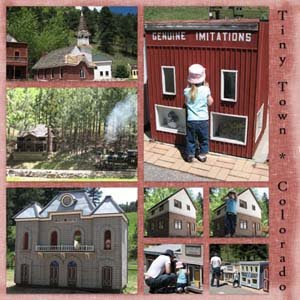


Tiny Town, Colorado
Template: LinasLayouts_Template034

The second layout was created by Tammy. I like how the orange title mirrors the orange of the inner tube and T-shirt. I also like how the background gives the impression of water. It goes well with the page theme.
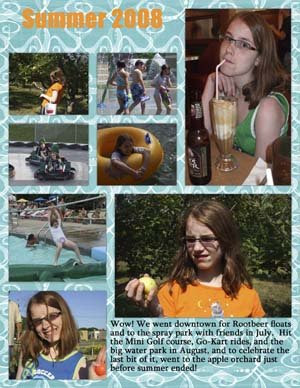


Summer 2008
Template: LinasLayouts_Template016a
Background: by Erica Hernandez at Two Peas in a Bucket

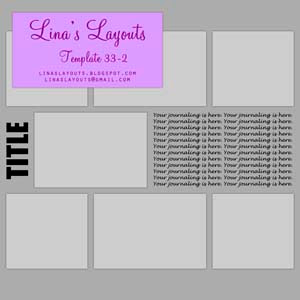
I also had a request for screenshots of how to print pages made with Template 33 (a two-page layout). These are screenshots from Adobe Photoshop CS3. I don't have Photoshop Elements, but I'm hoping they are fairly similar. I didn't take screenshots of everything. I only included the program windows that I thought might be confusing.

When you are done with your layout, flatten your image. To prevent overwriting the layered file, save this flattened image as a jpg (or whatever image file you usually use). Press Alt+Ctrl+C to adjust the canvas size. Set the width to 12 inches and keep the height the same. To set the anchor, click on the arrow pointing directly to the left. The window should look like this:
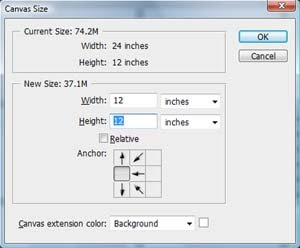


Click OK and the following window will come up:
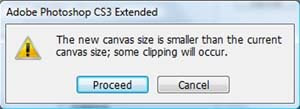


Click Proceed. You should now have an image with just the left side of your layout. You can save this new image as its own file if you would prefer to have the left and right pages separate. You can also resize the image to 8 inches square if you print 8x8 pages.

To get the right side of the layout, follow the same steps from above except this time set the anchor by clicking on the arrow pointing directly right. This is what the window should look like:
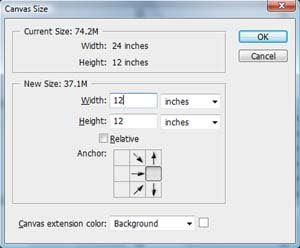


Click on OK. Click on Proceed in the window that comes up. You should have an image with just the right side of your layout. Save as a new file if desired. That's it!

If you are wanting to only make a one-page layout, Template 33 doesn't work very well because of the photo overlap between the two pages. So I've adjusted it a little to make a one-page version. Here's what it looks like: